
SlotsLV App: How to Play Slots.lv on Mobile
Pretty much the coolest part of living in this day and age is being able to play slot games on your phone, and SlotsLV Casino is right there with you.
However, our app experience works a little differently.
Unlike regular apps, which you download from the App Store or Google Play and install on your device, the SlotsLV app isn’t a traditional download.
Instead, it’s a home-screen shortcut to our mobile website. You add it directly from your browser, and it opens just like an app, giving you quick, one-tap access to the full casino experience.
Sound like a plan, Stan? Let’s get into how to get it and how it works.
What is the SlotsLV Mobile App?
The SlotsLV app works as a shortcut to our regular casino that automatically opens like an app, scaling the games to your phone screen.
All of the games, bonuses, and features of the website are there, compact and tidy in the palm of your hand.
But as a shortcut to the website, our “app” doesn’t take up any storage on your phone with stored files, background data, and assets.
How to Download the SlotsLV App for Android
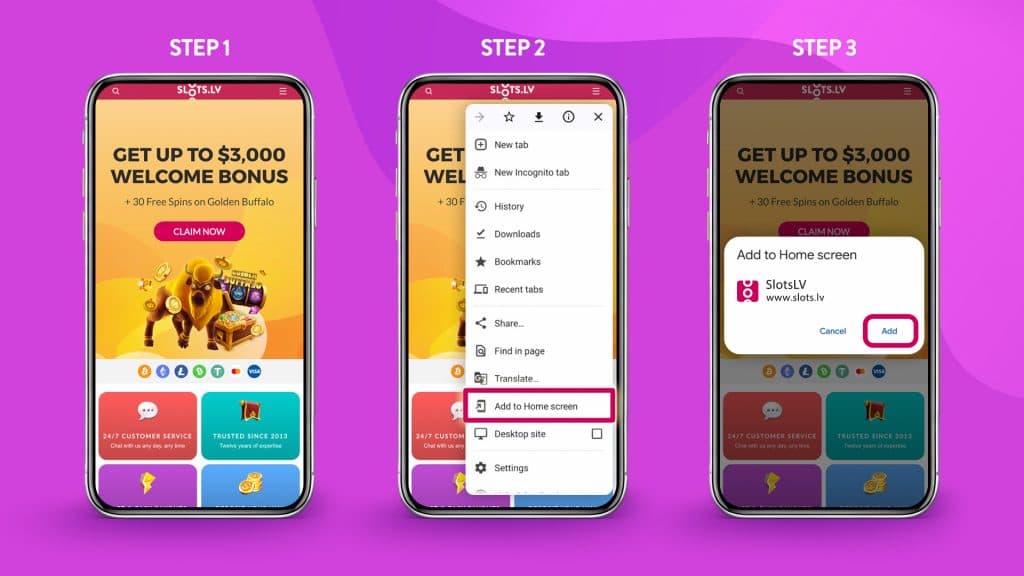
How do you get your fingertips on the slots.lv app? Follow these steps.
- Open slots.lv from your browser. Hi there! Good to see ya.
- Go to your browser’s menu and tap “Add to home screen.” If you’re using Chrome, it’s towards the bottom.
- Tap “Install.”
Now, you should have an icon with the SlotsLV Casino logo in your app drawer. That’s the SlotsLV mobile app, done and done.
How to Download the SlotsLV App for iOS
For Apple users, follow these steps to download the SlotsLV casino app.
- Open Slots.lv in Safari.
- Tap the share icon at the bottom of your screen.
- Scroll down and tap “Add to Home Screen.”
- Hit “Add.”
Now you’ll see the SlotsLV Casino icon sitting pretty on your home screen. Tap it, and you’re knee deep in action.
SlotsLV Casino App Features
Finding Slot Games
First things first. Unlock landscape mode on your phone. You’ll enjoy the app experience much more.
Now that’s out of the way, look for the magnifying glass at the top left of the screen. This is how you’ll search for games.
Type in any game you want to check out, be it a brand-new slot, a classic fave, or a game to try one of your top slot betting systems.
You could also tap on one of the theme categories in the gray banner to pick from our prearranged selection. You’re the boss here, so take the reins.
Full-screen Mode
Once the game loads, make sure you’re embracing the full experience before you get tap-happy on the ‘Spin’ button.
Are you in landscape mode? Good, because that’s the first step. Now, the game will automatically open in semi-full-screen mode, but you want to eliminate all distractions.
In that case, tap the arrow on the top right of the screen. This will hide the SlotsLV bar, deposit, and ‘back’ buttons, so you have the true full-screen view of your game.
If you want the bar back, tap the arrow again—yep, that teeeeny tiny one in the top right corner.
Updates
Since the SlotsLV app isn’t a traditional download, you might be wondering how to receive updates. We’ve got great news! That’s not your prob—that’s on us.
When we update the website, the update automatically applies to your homescreen shortcut, aka the SlotsLV mobile app. All you have to worry about is opening the app and having fun. Sweet deal.
SlotsLV App Experience
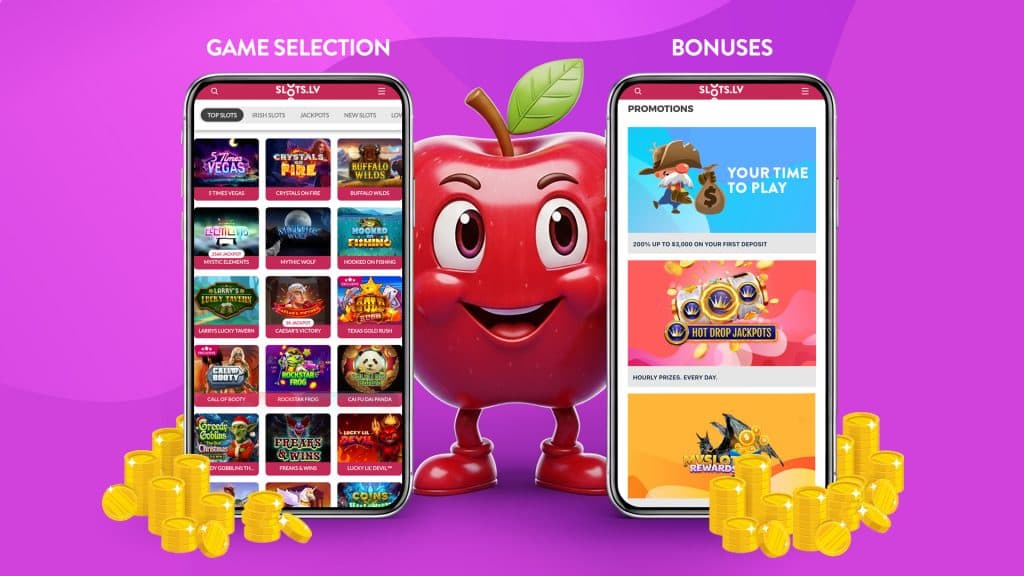
If you’re thinking the app must be missing handy features from the regular website, think again!
The Slots.lv app is a direct replica of the website, games, bonuses, and features. The only difference when it comes to desktop vs. mobile is the convenience. Let us show you what we mean.
Game Selection
You trust us for having the most elite game selection online, and it’s no different when you open SlotsLV in our app or on a regular desktop browser. But now, the SlotsLV mobile games are scaled to your screen.
The front page is an endless scroll of themes and characters, from Julius Caesar beckoning you to the Colosseum to a mysterious wolf howling at the moon.
Although the app shows a more compact layout with smaller icons and text to fit your screen, we haven’t skimped out on any games. What you see on your desktop is what you see on your phone, including progressive jackpot slots and Hot Drop Jackpots.
The real question here is, how do you find the right slot for you? Now that’s a fun rabbit hole to dive into!
Bonuses
Hundreds of players take advantage of SlotsLV bonuses every day, and we’re delighted to share. Accessing a bonus through your phone is no different.
At the top right of the screen, tap on the hamburger icon, and then “Promotions.” Open it up and…yep—no surprise there!
You still have access to the daily Super Scratch Card, Welcome Bonus, MySlots Rewards, Crypto Club, and Refer a Friend bonus. Nothing changes just because you’re grabbing a bonus from the app. Well, maybe one thing changes: it’s a great deal more convenient. And we love that.
Deposits
It’s easy to deposit on the SlotsLV website, and just as easy to do so on the mobile app. Simply head to the cashier, hit “Deposit,” and select your method. Hint: crypto deposits are always the fastest.
Follow the instructions to deposit your cash as always, and get on your merry way to play.
Withdrawals
What happens if you win a massive prize from the phone app instead of the website? Are you in big trouble? Not a chance.
All of your winnings on the phone work exactly the same as your winnings on your laptop or computer. To receive your proud payday, tap the profile icon in the top-right corner, then request a withdrawal from the cashier.
You’ll glide through the same process of selecting your withdrawal method, entering the amount you’d like to take home, and submitting the request for approval. Nothin’ but smooth sailing.
Support
Of course, issues might arise from time to time. At the end of the day, we’re all humans navigating a world of technology. If you’re on your phone, you’re not lost—we got you.
Look for the little pink speech bubble in the bottom-right corner of the screen. That’s how you contact us for support.
Tap it, jot down some details about your account, and share the details of how we can help you. A real human will get back to you ASAP to help resolve the issue.
SlotsLV Mobile App: Troubleshooting & Safety
SlotsLV keeps your account and payments locked down, but you still have a role to play, especially when you’re using a browser-based app.
If something isn’t loading right or a download link looks off, you’ll want to know what’s normal and what’s not.
Below is how to fix common issues and avoid anything sketchy while you play. This is the internet, after all. ‘Nuff said.
Common Fixes
If something feels off while navigating the app, it’s usually a quick n’ easy fix. Since the app runs in your browser, most issues stem from your connection or settings, not the platform itself.
Here are some common errors you might encounter.
- Game not loading. Refresh the page or close and reopen the shortcut, aka the SlotsLV app.
- Slow or laggy. Check your Wi-Fi and do the on-and-off-again dance. If that doesn’t work, switch to mobile data.
- Blank screen or freezing. It’s worth checking whether your browser is up to date.
- Shortcut not working. Delete it and add it back from your browser. It takes just a few seconds.
Fake SlotsLV “APK” Warnings
If you see a site telling you to download a SlotsLV APK, stop right there. That’s not how this works.
SlotsLV does not have a downloadable Android app. There’s no APK file, no install screen, and nothing you should be sideloading onto your phone. The only official way to use it is through your browser or by adding the site to your home screen as a shortcut.
The following safety tips are essential.
- Avoid any APK downloads claiming to be SlotsLV. It’s not us!
- Stick to the official website only
- Never enable “Install unknown apps” just to access the casino. You won’t have to do that for the real SlotsLV mobile app.
Do you have your phone on you? Great! Then you’re ready to fire up the SlotsLV app and get playing.
Everything on the app works the same as it does on desktop, but now, you can play your favorite games from anywhere. Go ahead—download the shortcut from your phone’s browser, open it up, and explore the wide, wonderful world of SlotsLV.
SlotsLV Casino Mobile App – FAQs
Is there a real SlotsLV app I can download?
Nope. The Slots.lv app is actually a shortcut to our regular website on your phone. However, it functions just like an app would.
How do I install the SlotsLV app?
Open slots.lv on your phone’s browser. Tap the browser menu and select “Add to Home Screen.” It appears as an app icon in your app drawer.
Does it have all of the same features as the website?
100%. The SlotsLV mobile app is a direct replica of the website. You have access to the same games, bonuses, and features. You won’t miss a thing.
Does it take up storage on my phone?
Barely any. Our app is just a shortcut. It’s not a full APK download with stored files, background data, and app assets taking up space on your device.
Can I use it on both Android and iPhone?
Definitely, we don’t play favorites. The app works the same way, regardless of your phone type.